
Tesla Halloween Mode: How to Unlock Spooky Display Visuals and Exterior Sounds

 Halloween Ideas & Trends
Tesla Halloween Mode: How to Unlock Spooky Display Visuals and Exterior Sounds
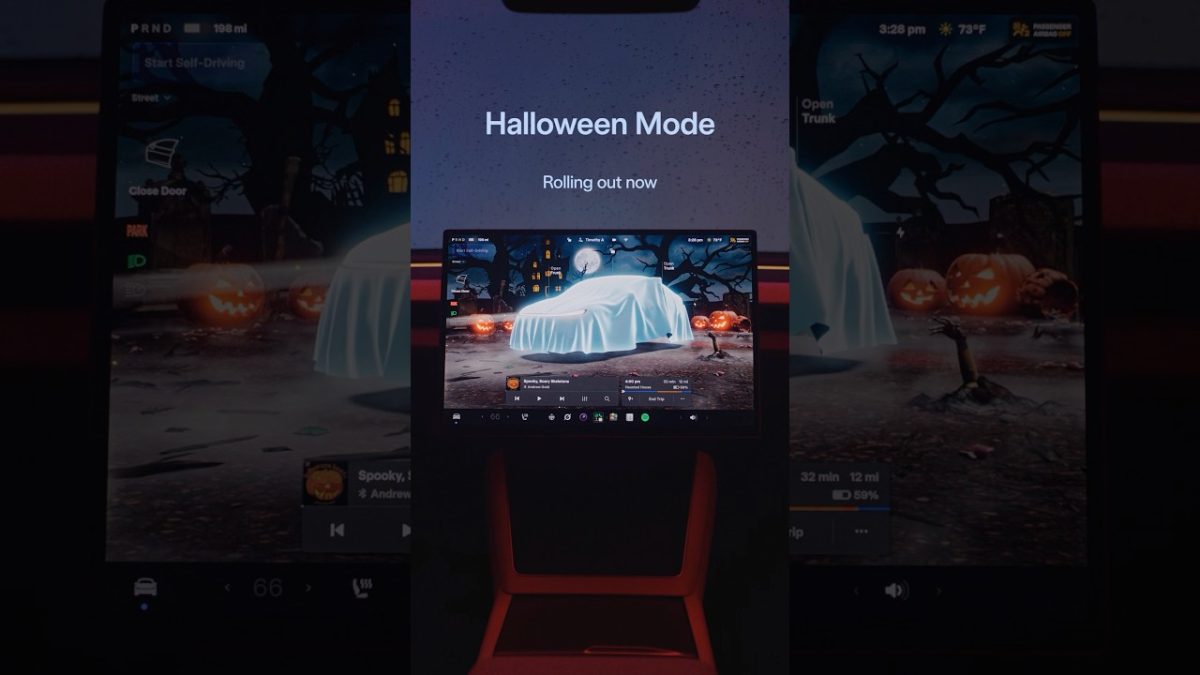
Tesla Halloween Mode transforms the electric vehicle into a haunted celebration on wheels, altering the central touchscreen visuals, ambient lighting cues, and exterior audio alerts with a single tap. Designed as part of the brand’s signature software surprises, this festive configuration shifts the digital vehicle avatar into a pumpkin or spooky motif and triggers customized acoustic effects inside and outside the cabin.
Owners across the United States regularly discover seasonal features embedded inside the vehicle operating system as over-the-air firmware updates roll out. Rather than serving purely utilitarian functions, these software additions demonstrate how modern connected vehicles leverage software-defined architecture to modify audio-visual profiles on demand. Unlocking the experience requires navigating built-in submenus that many daily commuters overlook during routine driving.
Inside the Toybox: Visual and Acoustic Transformations
Every Tesla vehicle equipped with contemporary software includes an entertainment suite known as the Toybox. When seasonal modes are enabled, the visual interface replaces standard highway rendering with holiday-themed graphics, rendering pedestrians as figures such as ghosts or zombies and converting the digital car model into an eerie seasonal equivalent.
Beyond the graphics, modern Tesla models equipped with the external Pedestrian Warning System speaker can project exterior sound effects. These exterior chimes replace standard lock confirmation sounds with spooky audio bites, such as creaking doors, screams, or organ melodies, whenever the vehicle detects key proximity or remote commands.
Software-defined vehicles allow automakers to deploy seasonal digital experiences instantaneously, turning vehicle personalization into an interactive digital interface rather than a physical aftermarket accessory.
Core Features and System Requirements
Activating seasonal effects depends partly on the vehicle build date and regional hardware configurations. While older Model S and Model X units without external speakers handle visual animations exclusively on the primary display, newer Model 3, Model Y, and Cybertruck builds leverage full interior and exterior sound modulation.
| Feature Component | System Behavior |
|---|---|
| Instrument & MCU Display | Spooky vehicle avatar, custom road rendering, and seasonal color palettes. |
| Pedestrian Warning Speaker | Broadcasts custom holiday lock sounds, horns, and outdoor audio effects. |
| Light Show Automation | Synchronizes matrix headlights, taillights, and cabin lights to festive audio tracks. |
| Lock Confirmation | Substitutes the standard chirp with a themed audio notification upon departure. |
Step-by-Step: How to Activate Halloween Mode
Activating these seasonal features takes only a few taps while the vehicle remains parked in a safe location. The system disables active entertainment triggers once shifted into drive to comply with road safety standards.
- Shift your Tesla into Park and ensure the central touchscreen is active.
- Tap the App Launcher icon (represented by three dots or the grid icon) on the main bottom dock.
- Select Toybox from the application grid to view all installed Easter eggs and entertainment modes.
- Locate the seasonal or spooky mode tile, tap to open the setup screen, and follow the on-screen animation to initiate the theme.
- To assign custom lock sounds, navigate to Toybox > Boombox > Lock Sound and select your preferred holiday chime.
Myths vs. Reality: Vehicle Performance and Safety Limits

A common misconception among newer EV drivers is that engaging themed modes impacts driving dynamics, acceleration parameters, or battery range. In reality, the software suite functions entirely on the infotainment layer and does not alter the motor inverter mapping, suspension dampening, or energy consumption outside of standard screen usage.
Another persistent myth suggests that custom exterior sounds can play continuously while driving down public roads. Federal motor vehicle safety regulators maintain strict guidelines regarding pedestrian alert sounds; consequently, custom audio features through the Boombox function are limited to stationary use or specific low-speed reverse operations depending on vehicle model year and software compliance.
💡 Check your current software release in the Software menu to ensure you have the latest holiday asset pack downloaded over Wi-Fi.
🔍 Experiment with Boombox settings while parked to test your custom holiday lock sounds safely away from moving traffic.
👇 Leave your thoughts in the comments below and share your favorite seasonal Tesla Easter egg with fellow owners!